
Online Banking Security Update Now Live
Your Security Is Our Top Priority
Our enhanced online banking security feature is now live, providing stronger cybersecurity protections to help detect fraud and keep your online banking safe and secure.
Each time you log in to Online Banking, the system verifies not only your login credentials, but also the device you're using. If a new device or unusual activity is detected, you may be asked to take an extra step to confirm your identity using a one-time passcode sent to your phone*.
Important First Time Enrollment Instructions:
The first time you log in to Online Banking through our website or Mobile Banking app, you will be prompted, this one-time only, to set up your phone number and choose your preferred delivery method - text message or phone call.
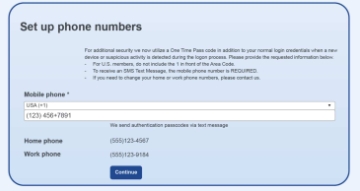
You'll then receive a one-time passcode. Enter the passcode during login to verify your identity and access your account.
For a quick walkthrough, see the step-by-step enrollment tutorial shown on the right.
How This Security Feature Works:
This added security step is only triggered when our system detects activity that appears outside your normal login behavior or when potentially suspicious activity is identified - such as logging in from a new device, making an unusually large transaction, or changing key account information.
When this occurs, a one-time passcode will be sent to your preferred phone number. Simply enter the passcode to complete your login and continue banking securely.
Frequently Asked Questions
Why am I being asked to enter a passcode when I log in?
This extra step helps protect your account. If our system detects a new device or unusual activity, you’ll be asked to verify your identity with a one-time passcode.
Will I need to enter a passcode every time I log in?
No. A passcode is only required when something looks different from your usual login activity or when potentially suspicious activity is detected.
How will I receive my passcode?
Your passcode will be sent to the phone number you set up in Online Banking, either by text message or phone call—whichever you choose.
What if I get a new phone or change my number?
You can update your phone number anytime in Online Banking under Profile, or contact Customer Care for assistance.
What should I do if I receive a passcode I didn’t request?
Do not share the passcode with anyone. Contact Peoples Bank Customer Care immediately so we can help secure your account.
Does this change how I use Online Banking?
No. Your day-to-day banking stays the same. This feature simply adds an extra layer of protection when it’s needed.
We continue to seek ways to enhance the security of our online services.
Questions? Please contact Customer Care at 815-936-7600 or stop by any of our three locations.
*Data rates may apply
